
When accessibility is folded into QA, it stops being a practice and becomes a checkbox on a release form. That checkbox does not stop a lawsuit, an EU complaint, or a blind user from abandoning your checkout.
Scroll through job boards today and you will see a new kind of opening: “QA Engineer (Accessibility)”, “Test Analyst with WCAG knowledge”, “SDET – Accessibility a plus”. One person is expected to own functional regression, automation frameworks, release sign-off and digital accessibility compliance, often in the same sprint.
I have spent eleven years in software quality and accessibility, the last six focused fully on accessibility. I respect QA deeply. But QA and accessibility are two different disciplines, and merging them quietly transfers legal and business risk onto a role that was never built to carry it.
Key takeaways
- QA checks that a product works; accessibility checks that disabled people can actually use it. They need different skills.
- Automated tools find only part of the problem. In one 2026 comparison, axe-core matched under a quarter of the issues expert auditors found.
- Manual testing, screen reader testing and sessions with real disabled users are what make a product safe to sell in regulated markets.
- Legal risk is rising in the US, the EU and India. Courts are now ordering companies to fix their sites on a deadline.
- Merging the roles to save budget moves that risk onto a person who was never hired to carry it.
Why companies are merging QA and accessibility roles
The honest reason is money. Accessibility budgets are tight, and one “QA + accessibility” hire looks cheaper than a tester plus a specialist.
The data backs this up. In Level Access’s State of Digital Accessibility report (2025–2026), around one in five organisations named insufficient budget as a top challenge, alongside weak executive support and confusion about legal requirements. Hassell Inclusion’s Digital Accessibility Trends 2026 notes that while accessibility roles grew in 2025, some specialists lost their jobs in downsizing.
Large layoffs show the same pattern. In July 2026, Microsoft’s Xbox restructuring announced 3,200 role cuts, and PC Gamer reported that the cuts hit its accessibility leadership hard. When budgets shrink, accessibility is often the first specialist function to be absorbed into “general quality”.
Three beliefs make the merge feel safe to leadership:
- “Automation will cover it.” Run axe or Lighthouse in the pipeline and call it done.
- “WCAG is just another test spec.” Write test cases against success criteria and tick them off.
- “An overlay or AI tool can fix the rest.” Install a widget and display a compliance badge.
Each of these beliefs is wrong, and the rest of this post shows why.
QA and accessibility are different disciplines
QA asks, “Does the product work as specified?” Accessibility asks, “Can a person with a disability actually use it?” A feature can pass every functional test and still be unusable with a screen reader.
| Dimension | Quality assurance | Accessibility |
|---|---|---|
| Core question | Does it meet the requirement? | Can disabled people complete the task? |
| Reference | Product specs, user stories | WCAG 2.2, EN 301 549, Section 508, ADA, EAA |
| Main tools | Test management, Selenium, Playwright, API tools | NVDA, JAWS, VoiceOver, TalkBack, magnifiers, voice control, keyboard |
| Judgement type | Mostly pass/fail against expected results | Interpretive: is this alt text meaningful, is this reading order logical? |
| Where it starts | After build, in the test cycle | At design and content stage, before code exists |
| Output | Bug reports, release sign-off | Audit reports, VPAT/ACR, remediation guidance, design reviews |
| Skill to master | Test design, automation | Assistive technology fluency, ARIA, disability user behaviour |
A good accessibility specialist spends years learning how a blind user navigates by headings, how a voice-control user triggers buttons, and why a perfect contrast score can still hide a broken focus order. That knowledge does not come from a weekend WCAG course.
Accessibility is also a design and content problem. Many failures, such as confusing labels, colour-only meaning and unpredictable flows, are baked in before a tester ever sees the build. A QA role that only joins at the end of the sprint cannot prevent them.
The automation gap: a green pipeline is not an accessible product
When QA owns accessibility, it usually becomes an automated scan in CI. Every major study shows automation catches only part of the problem, and misses the barriers that hurt users most.
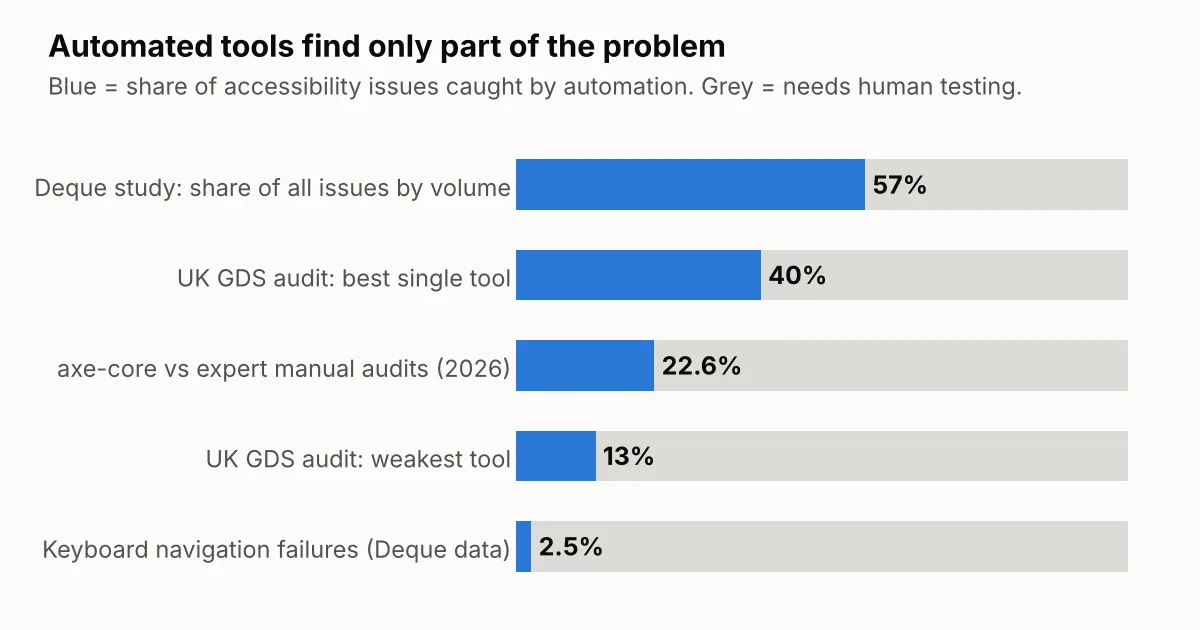
Chart description: what automated tools catch
Share of accessibility issues caught by automated testing. The rest needs human testing.
- Deque study, share of all issues by volume: 57%
- UK GDS audit, best single tool: 40%
- axe-core compared with expert manual audits (2026): 22.6%
- UK GDS audit, weakest tool: 13%
- Keyboard navigation failures (Deque data): 2.5%
| Study | What it found |
|---|---|
| UK GDS tool audit | Of 143 deliberate barriers, 42 were missed by every tool tested. Single tools found between 17% and 41%. |
| GDS updated audit (13 tools) | Best tool fully detected 40% of 142 barriers; the weakest found 13%. |
| Deque coverage study | Automated axe testing covered 57% of issues by volume across 2,000+ audits, but only 16 of 50 WCAG 2.1 AA success criteria had automated findings. |
| Evinced vs manual audits, Jan 2026 | axe-core alone matched 22.6% of issues found by expert manual auditors on 35 production sites. |
Even the most optimistic number, Deque’s 57%, depends heavily on easy-to-detect issues like colour contrast. GDS itself concluded that tools should be combined with manual checks, an expert audit and user testing.
The gap is widest where it matters most. Accessibility.Works notes that Deque’s own data puts automated detection of keyboard navigation failures at about 2.5%, while colour contrast is caught about 98% of the time. A high overall percentage can hide near-total blindness to the issues that lock users out.
The problems automation cannot judge are exactly the ones that block a task:
- Is the alt text meaningful, or just “image123.png”?
- Does keyboard focus move to the modal, and back when it closes?
- Does the screen reader announce the error message when the form fails?
- Is the reading order logical, and is the visible focus indicator actually visible?
- Does a custom dropdown work with NVDA, JAWS, VoiceOver and TalkBack?
The wider web shows what happens when scans replace expertise. The WebAIM Million 2026 found an average of 56.1 errors per homepage, up from 51 the year before, and 95.9% of the top one million homepages had detectable WCAG failures. Those are only the errors a machine can find.
Manual, screen reader and real-user testing are not optional
If you want your product to move freely in the US, EU and global markets, you need three layers of testing on top of automation that a QA checkbox cannot deliver: expert manual testing, assistive technology testing, and testing with real users with disabilities.
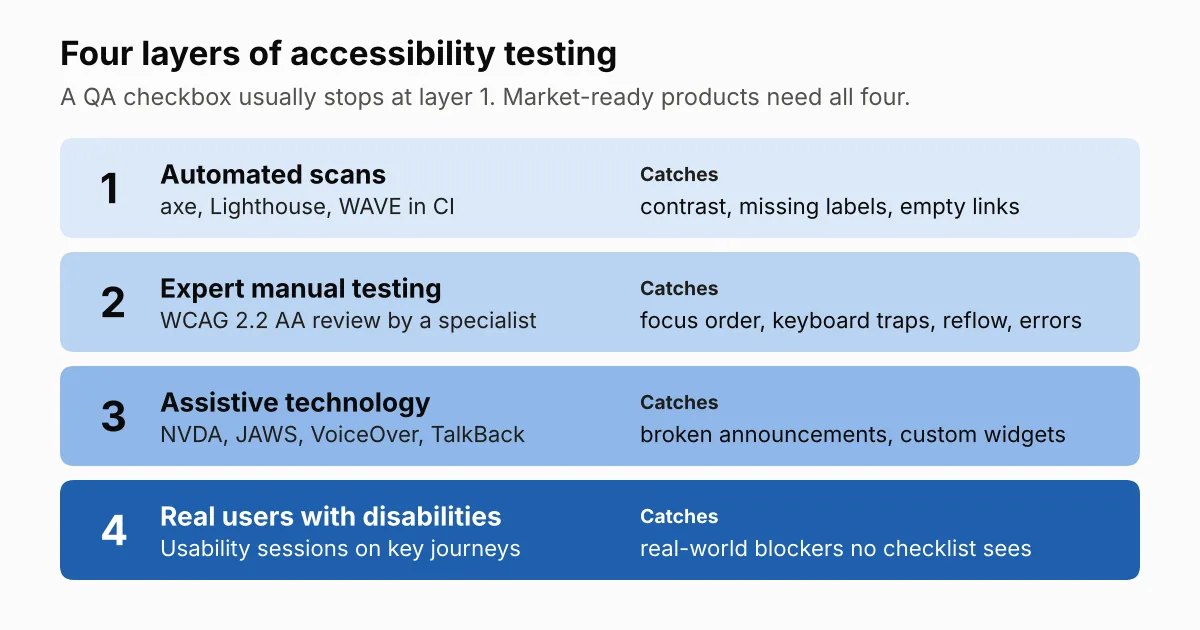
Diagram description: the four layers of testing
- Automated scans (axe, Lighthouse, WAVE in CI) catch contrast, missing labels and empty links.
- Expert manual testing (WCAG 2.2 AA review by a specialist) catches focus order, keyboard traps, reflow and error handling.
- Assistive technology testing (NVDA, JAWS, VoiceOver, TalkBack) catches broken announcements and custom widgets.
- Real users with disabilities (usability sessions on key journeys) catch real-world blockers no checklist sees.
1. Expert manual testing. A trained specialist walks every key journey against WCAG 2.2 AA: keyboard-only, zoom to 400%, reflow, contrast, forms, error handling and timing. This is where judgement-based success criteria get evaluated.
2. Assistive technology testing. Screen readers behave differently. WebAIM’s Screen Reader User Survey #10 (1,539 respondents) found JAWS at 40.5% and NVDA at 37.7% as primary desktop screen readers, and 91.3% of respondents use a screen reader on mobile. Testing on one browser with one screen reader is not coverage. You need realistic pairings: NVDA and JAWS with Chrome, VoiceOver with Safari on iOS and macOS, and TalkBack on Android. My screen reader testing guide shows how to start.
3. Testing with real users with disabilities. The W3C’s own guidance on involving users in evaluation says evaluating with disabled and older users finds usability issues that conformance checks alone do not. A blind daily screen reader user moves through your product in ways a sighted tester simulating a screen reader never will.
Courts and settlements increasingly expect human evaluation too. One bakery sued while using an overlay reported that its settlement required it to retain human auditors.
The W3C is equally clear that user testing alone is not enough: it should be combined with WCAG conformance evaluation by experts. That combination is exactly what disappears when accessibility becomes one line in a QA engineer’s job description.
The compliance risk is real, and it is growing
Accessibility compliance is no longer a future concern. In the US, website lawsuits rose again in 2025; in the EU, the European Accessibility Act is now producing court orders and daily penalties.
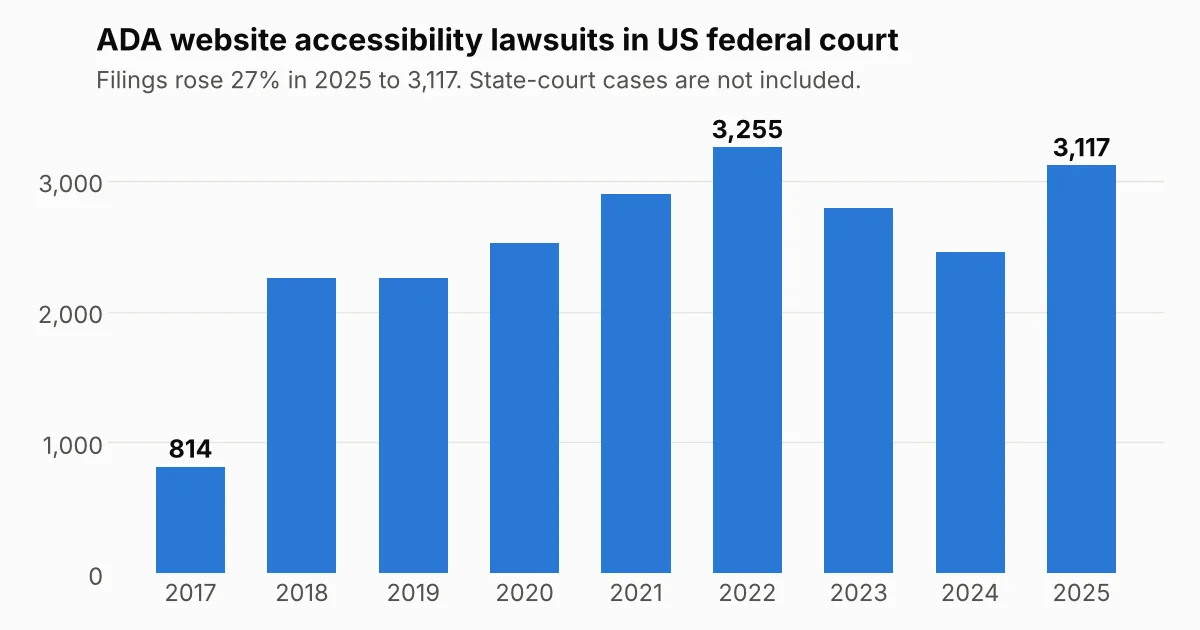
Chart description: ADA website lawsuits by year
Website accessibility lawsuits filed in US federal court each year:
- 2017: 814
- 2018: 2,258
- 2019: 2,256
- 2020: 2,523
- 2021: 2,895
- 2022: 3,255 (the peak)
- 2023: 2,794
- 2024: 2,452
- 2025: 3,117, up 27% on 2024
State-court cases are not included.
| Regime | Where it bites | Current state (October 2026) |
|---|---|---|
| ADA Title III (US, private businesses) | Lawsuits and demand letters | 3,117 federal website lawsuits in 2025, up 27% from 2024 and 36% of all federal Title III cases. UsableNet’s mid-2026 report projects around 6,000 digital suits for 2026 including state courts. |
| ADA Title II (US, state and local government) | Public-sector buyers and their vendors | DOJ requires WCAG 2.1 AA; compliance dates moved one year to April 2027 for large entities, but existing ADA obligations still apply now. |
| Section 508 (US federal procurement) | Sales to government | A credible VPAT/ACR is often a precondition to bid. |
| European Accessibility Act (EU) | Fines, market restrictions, court orders | Enforceable since 28 June 2025. Maximum fines include €100,000 per violation in Germany and €1 million in Spain; in Italy, serious or persistent violations can cost up to 5% of annual turnover. |
Three facts should worry any leadership team planning to fold accessibility into QA:
- Repeat lawsuits are common. In 2025, 46% of federal cases targeted companies that had already been sued before. A settlement without proper remediation only buys time.
- Courts are ordering fixes. On 4 June 2026, a French court in Caen ordered Carrefour to make its online shop fully accessible; reports say it has six months, backed by a €500 daily penalty. Even in the Auchan case that was dismissed, the Lille court acknowledged the site was not accessible for visually impaired users.
- Shortcuts are punished. In April 2025, the US FTC finalised an order requiring overlay vendor accessiBe to pay $1 million over misleading compliance claims, and UsableNet counted more than 1,400 businesses with accessibility widgets named in lawsuits in 2025. I explain why in Why accessibility overlays don’t make your website compliant.
The EAA also applies to companies outside the EU that sell to EU consumers. An Indian, US or UK product team that ships into Europe carries this risk whether or not it has an EU office. My European Accessibility Act checklist covers what to do first.
India is catching up fast
Indian companies sometimes treat accessibility as a Western compliance issue. That view is now out of date.
- RPwD Act, 2016. The Rights of Persons with Disabilities Act already makes accessible information and communication technology a legal duty.
- Supreme Court, Rajive Raturi v. Union of India (8 November 2024). The Court held that the existing accessibility rule (Rule 15) was inconsistent with the RPwD Act and directed the government to frame mandatory accessibility standards.
- Digital KYC ruling (April 2025). The Supreme Court later directed changes to digital KYC norms so that persons with disabilities are not shut out of digital financial services.
- SEBI digital accessibility circulars. SEBI now requires its regulated entities, including brokers, mutual funds, exchanges and depositories, to make their digital platforms accessible. Its circular of 31 July 2026 set 31 October 2026 as the deadline to complete accessibility audits and fix the findings. Earlier circulars require IAAP-certified auditors and reports signed by senior leadership.
A SEBI-regulated firm cannot meet an audit-and-remediation mandate with a QA engineer running a browser plugin. It needs qualified accessibility professionals.
The risks companies take on when accessibility becomes a QA checkbox
Merging the roles does not remove accessibility work. It removes the person qualified to do it, and moves the risk somewhere less visible.
- False confidence. A dashboard of passing automated checks tells leadership “we are compliant” while the barriers that trigger complaints, such as keyboard traps, unlabelled controls and broken screen reader flows, are still there.
- Lawsuit and regulatory exposure. ADA lawsuits, EAA complaints and fines target live user journeys, especially checkout, sign-up and payment. These are exactly the flows that need manual and assistive technology testing.
- Lost deals. Enterprise and public-sector buyers ask for a VPAT/ACR. A report written without expert testing either fails procurement review or, worse, overstates conformance and creates legal liability later. See how to write a VPAT for what a defensible report needs.
- Expensive rework. When accessibility is checked only at the end of a sprint, design-level problems surface late. Fixing a component library after release costs far more than designing it right.
- Lost customers. Disabled people and their families spend an estimated £274 billion a year in the UK alone, and the Click-Away Pound research found inaccessible sites cost UK businesses £17.1 billion when users left. Those customers rarely file a bug report; they just leave.
- Burnout and attrition. A QA engineer asked to master test automation, regression, release sign-off and the full assistive technology stack will struggle to do all of them well. Good people leave, and the accessibility knowledge leaves with them.
- Reputation damage. Public lawsuits and court orders against well-known brands make news. “Accessibility” in a job title does not protect a brand when a blind customer cannot place an order.
What companies should do instead
QA and accessibility should work closely together, but as partners, not as one merged role. QA can run automated checks and catch regressions; accessibility specialists own standards, judgement and assistive technology testing.
- Keep a dedicated accessibility owner. Even a small team needs one specialist accountable for WCAG, EN 301 549 and VPAT accuracy.
- Shift left. Bring accessibility into design reviews, component libraries and acceptance criteria, not just the test phase.
- Use automation as a first filter, not a verdict. Run axe or similar tools in CI, then validate with manual and screen reader testing.
- Test with real assistive technology combinations. NVDA and JAWS on Windows, VoiceOver on iOS and macOS, TalkBack on Android, plus keyboard-only and zoom.
- Include people with disabilities. Run regular usability sessions with screen reader, low-vision, motor and cognitive-disability users on your key journeys.
- Train QA, don’t replace specialists. Teach testers the basics so they catch obvious regressions, while experts handle audits and complex judgement calls.
- Avoid overlays and compliance badges. Fix the source code instead.
Frequently asked questions
Can a QA engineer do accessibility testing?
Yes, for the basics: running automated scans, keyboard checks and catching obvious regressions. Full WCAG audits, assistive technology testing and VPAT writing need a trained accessibility specialist.
Is automated accessibility testing enough for compliance?
No. Studies from the UK Government Digital Service, Deque and others show automated tools miss a large share of barriers, especially keyboard, focus and screen reader issues.
Which screen readers should we test with?
At minimum NVDA and JAWS on Windows, VoiceOver on macOS and iOS, and TalkBack on Android, because each behaves differently.
Does the European Accessibility Act apply to companies outside the EU?
Yes. It applies to covered products and services sold to EU consumers, wherever the company is based.
Will an accessibility overlay protect us from lawsuits?
No. The FTC fined one overlay vendor $1 million over misleading compliance claims, and businesses using widgets continue to be sued.
Conclusion
Merging QA and accessibility looks like a saving on a budget sheet. In practice it trades a salary line for lawsuit exposure, EU enforcement risk, lost enterprise deals and customers who quietly leave.
Quality asks whether the product works. Accessibility asks whether it works for everyone. Treat it as a checkbox, and the market, and the courts, will eventually check it for you.
Need an independent view of where your product stands? I offer manual WCAG audits with screen reader testing for EU and US businesses. See my accessibility audit services or get in touch.
Sources
- Seyfarth Shaw: Federal website accessibility lawsuit filings bounce back in 2025
- Seyfarth Shaw: 2023 website lawsuit filings
- BeAccessible: ADA statistics and trends (UsableNet 2025 data)
- TestParty: Website accessibility lawsuit data (2026 midyear)
- UK GDS: What we found when we tested tools on the world’s least accessible webpage
- GDS accessibility tool audit
- Deque: Automated testing study identifies 57% of issues
- Accessibility.Works: Why you can’t trust automated WCAG testing tools
- Nexer Digital: The WebAIM Million Report 2026
- WebAIM: Screen Reader User Survey #10
- W3C WAI: Involving Users in Evaluating Web Accessibility
- University of Arizona: DOJ interim final rule on Title II dates
- Clym: EAA fines by country 2026
- Deque: France’s court decision under the EAA (Carrefour)
- Taylor Wessing: The EAA and BFSG, recap and update
- Lainey Feingold: FTC order against accessiBe
- Supreme Court of India: Rajive Raturi v. Union of India judgment
- AZB & Partners: India’s evolving accessibility framework
- TaxGuru: SEBI extends digital accessibility audit and remediation timeline
- Level Access: State of Digital Accessibility appendix
- Hassell Inclusion: Digital Accessibility Trends 2026
- PC Gamer: Xbox layoffs hit accessibility leadership
- AbilityNet: Businesses missing out on the purple pound
- Charity Digital: What is the Purple Pound
- TestParty: VPAT accessibility conformance report